
Appearance
Getting Started
This guide explains how to configure a webhook and prepare your application to receive webhook events.
1. Configure a Webhook
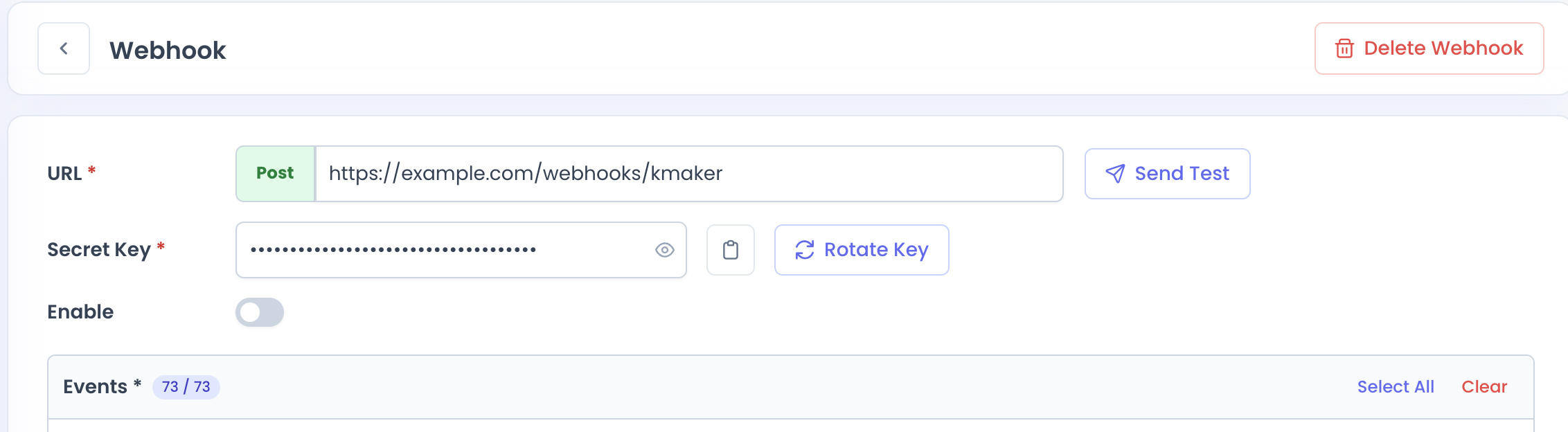
Create a webhook from the KMaker platform.
When configuring a webhook, provide the endpoint where you want to receive webhook events and select the events your application needs.
You can enable or disable the webhook at any time.
A webhook secret is generated for your webhook and is used to verify incoming requests. You can rotate the secret when needed.
Keep your webhook secret secure. Do not expose it in client-side applications or commit it to source control.
2. Configure Your Endpoint
Your endpoint must be publicly accessible and able to receive HTTP POST requests with a JSON request body.
For example:
text
https://example.com/webhooks/kmakerYour endpoint should accept requests with the following content type:
http
POST
Content-Type: application/json
Webhook requests also include headers used for signature verification and idempotency:
http
X-Kmaker-Signature: <signature>
X-Idempotency-Key: <event-id>
See Webhook Delivery for more information about the request format.
3. Verify the Webhook Signature
Every webhook delivery includes a signature generated using your webhook secret.
Your application should verify the signature before processing the request.
If signature verification fails, do not process the event.
See Signature Verification for the verification process.
4. Handle Duplicate Deliveries
Webhook events may be delivered more than once.
Use the eventId provided in the webhook payload as the idempotency key when processing events. The same value is also provided in the X-Idempotency-Key header.
Your application should ensure that processing the same event multiple times does not produce duplicate side effects.
See Webhook Delivery for more information about idempotency and retries.
5. Process the Event
After successfully verifying the webhook, use the eventType field to determine which event occurred.
The event-specific payload is available in data.object.
For example:
json
{
  "eventId": "d42a2f74-a2dd-4080-8645-d681cc490eaa",
  "eventType": "ALERT:CREATED",
  "createdAt": "2026-08-18T13:20:27.400518",
  "data": {
    "object": {}
  }
}
The structure of data.object depends on the event type.
See Events for the available event types and their payload schemas.
Next Steps
- Signature Verification — Verify webhook requests before processing them.
- Webhook Delivery — Learn about request format, idempotency, retries, and responses.
- Events — Explore available events and their payload schemas.